Training plans are personal wellness programs that employees can browse, configure, and follow at their own pace. Unlike challenges, which are admin-created and company-wide, training plans are self-directed — employees choose a plan that fits their goals and work through it individually.
What Training Plans Are
Training plans are VFit-managed programs designed by wellness experts. They are curated plans that guide employees through structured fitness progressions over multiple weeks.
There are currently 9 training plans available, covering a range of fitness levels and goals. Examples include:
- Couch to 5K — A progressive running plan for beginners, building from walking to running 5 kilometers.
- Step It Up — Gradual daily step increase programs.
- Strength foundations — Bodyweight and basic strength training progressions.
- Flexibility and mobility — Stretching and yoga-based programs.
- Active recovery — Low-intensity programs for employees returning from breaks.
Note: Training plans are not admin-created. The 9 available plans are built and maintained by the Vantage Fit team. Admins cannot currently create custom training plans.
How Employees Use Training Plans
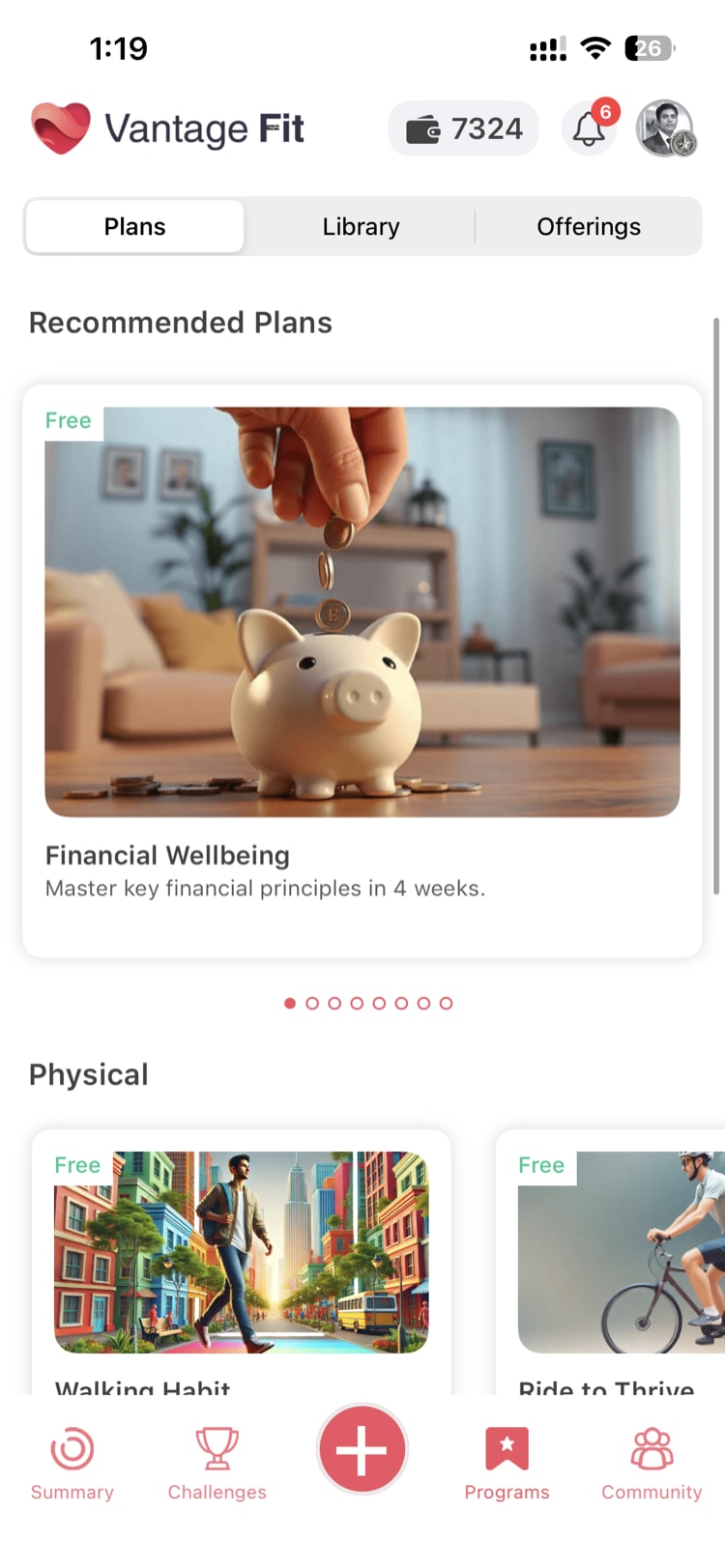
When training plans are enabled, employees see a Programs tab in their app. Here is how they interact with plans:
Browsing Plans
- The employee opens the Programs tab.
- They browse the available training plans.
- Each plan shows a description, duration, difficulty level, and what to expect.
Configuring a Plan
Once an employee selects a plan, they configure it to fit their schedule:
- Number of weeks — How long they want the plan to run.
- Days per week — How many active days per week.
- Which days — Specific days of the week (e.g., Monday, Wednesday, Friday).
This flexibility means the same plan can work for someone who exercises three days a week and someone who exercises six.
Starting and Following a Plan
- After configuration, the employee starts the plan.
- The plan runs as a personal challenge — tracked individually, not visible to other employees.
- Daily tasks appear according to the configured schedule.
- Progress is tracked automatically through the app.
Tip: Training plans are essentially personal challenges. They use the same underlying challenge infrastructure but are self-directed rather than admin-created.
The Admin's Role
As an admin, your role with training plans is limited but important.
Enabling the Feature
Your Vantage Fit account manager has to activate this feature for you.
To get training plans enabled:
- Contact your Vantage Fit account manager.
- Request that training plans be enabled for your company.
- Your account manager activates the feature.
- The Programs tab appears in the employee app.
Currently, approximately 11 companies have training plans enabled.
What Admins Cannot Do (Yet)
Being transparent about current limitations:
- No dashboard UI for plan management. There is no section in the admin dashboard for viewing, configuring, or managing training plans.
- No plan visibility. Admins cannot currently see which employees have enrolled in which plans, or track plan completion rates.
- No custom plans. Admins cannot create their own training plans. All 9 plans are managed by the Vantage Fit team.
- No plan selection control. Once enabled, all 9 plans are available to all employees. Admins cannot choose to show only certain plans.
How Training Plans Differ from Challenges
| Aspect | Training Plans | Challenges |
|---|---|---|
| Created by | Vantage Fit team | HR Admin |
| Participation | Self-directed (employee chooses) | Admin enrolls or invites |
| Visibility | Personal/private | Company or team-wide |
| Schedule | Employee configures days/weeks | Admin sets start/end dates |
| Leaderboard | None | Yes (most challenge types) |
| Points | Based on activity completion | Based on challenge rules |
| Social element | Individual only | Team-based, leaderboards, chat |
Tip: Training plans and challenges serve different purposes. Challenges drive group engagement and friendly competition. Training plans serve employees who prefer self-directed, personal wellness journeys. Together, they address a wider range of employee preferences.
Best Practices
- Communicate when you enable it. If you turn on training plans, let employees know through a push notification or email. The Programs tab will appear in their app, but they may not notice it without a prompt.
- Position plans as personal wellness support. Not every employee thrives in competitive challenge environments. Training plans offer a private, self-paced alternative. Frame them as "your personal wellness journey" rather than another thing to compete in.
- Pair with challenges. An employee might follow a "Couch to 5K" training plan personally while also participating in a company-wide step challenge. The two complement each other.
- Gather feedback. Since you cannot currently see plan usage data, ask employees informally whether they are using training plans and which ones they find valuable. This feedback helps shape future development.
Need more help? Contact your Vantage Fit account manager or email support@vantagecircle.com.
Related articles: