The Vantage Fit Marketplace is a curated directory of partner wellness offerings available to your employees. It showcases fitness products, wellness services, subscriptions, and Employee Assistance Programs (EAP) from vetted partners — all accessible from within the Vantage Fit app.
What the Marketplace Is
Think of the Marketplace as a wellness shopping guide within the app. It does not handle purchases directly — instead, it connects employees with external partner offerings through curated listings.
The Marketplace includes:
- Fitness products — Wearables, workout equipment, activewear.
- Wellness services — Gym memberships, personal training, meditation apps.
- Subscriptions — Health food delivery, wellness app subscriptions.
- EAP (Employee Assistance Programs) — Mental health support, counseling services, crisis helplines.
Note: The Marketplace is a curated directory, not an e-commerce platform. Vantage Fit does not process payments or manage transactions. Employees are redirected to partner websites to learn more or make purchases.
How Employees Use the Marketplace
Browsing Offerings
- Employees open the Marketplace section in the app.
- Offerings are organized into categories in a tree structure — broad categories with subcategories beneath them.
- Employees browse by category or scroll through all listings.
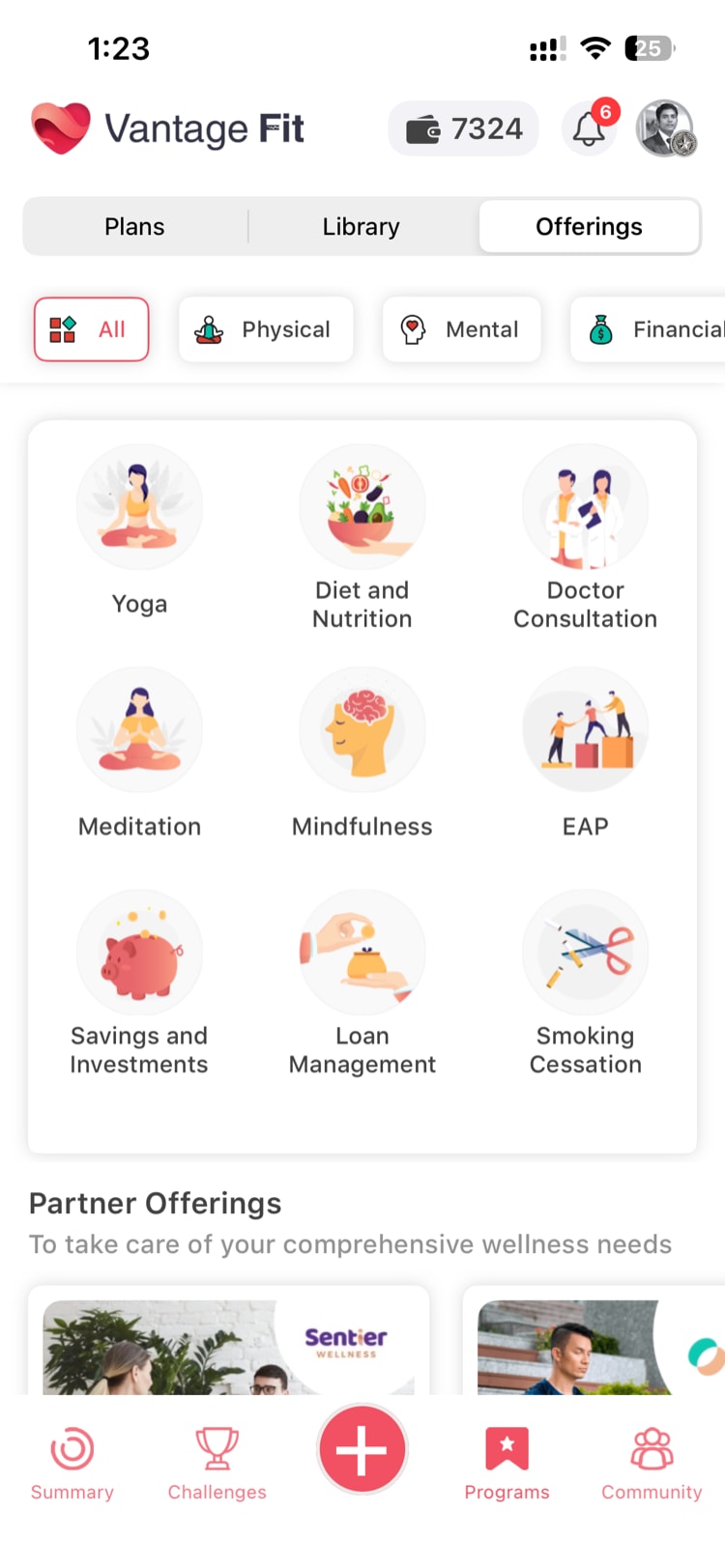
Viewing a Listing
Each marketplace listing includes:
- Partner name and logo.
- Description of the product or service.
- Category it belongs to.
- Link to the partner's website or offering page.
Redeeming or Visiting a Partner
- The employee taps on a listing they are interested in.
- A disclaimer popup appears, informing the employee they are leaving the Vantage Fit app.
- After acknowledging the disclaimer, the employee is redirected to the partner's external website.
- Any transactions happen directly with the partner — not through Vantage Fit.
Tip: The disclaimer popup is important. It sets expectations that the employee is leaving Vantage Fit's environment and that any purchases, subscriptions, or interactions are with the partner directly.
Category Structure
Marketplace offerings are organized in a tree structure:
Marketplace
├── Fitness Equipment
│   ├── Wearables
│   ├── Home Gym
│   └── Accessories
├── Wellness Services
│   ├── Gym Memberships
│   ├── Yoga Studios
│   └── Personal Training
├── Nutrition
│   ├── Meal Plans
│   ├── Supplements
│   └── Healthy Snacks
├── Mental Wellness
│   ├── Meditation Apps
│   ├── Counseling
│   └── EAP Services
└── Subscriptions
    ├── Fitness Apps
    └── Wellness Platforms
Categories may vary based on available partner offerings. The tree structure makes it easy for employees to find what they are looking for.
The Admin's Role
What Admins Can Do
Your role with the Marketplace is primarily awareness and communication:
- Know that it is available — Marketplace is enabled by default for most companies.
- Promote it to employees — Many employees do not know the Marketplace exists. A push notification or email highlighting it can drive discovery.
- Direct employees to EAP resources — If your company's EAP is listed in the Marketplace, it becomes an easy access point for employees who need support.
What Admins Cannot Do
- Add or remove offerings. The catalog of partner listings is managed centrally. Admins cannot add their own preferred vendors or remove listings.
- Customize categories. The category tree is managed centrally and applies to all companies.
- Control pricing or promotions. Any discounts or special offers are managed by the partners themselves.
Enabling and Disabling the Marketplace
Your Vantage Fit account manager manages this feature for you.
- Enabled by default for most companies.
- Disabled for specific companies upon request.
If you want the Marketplace enabled or disabled for your company, contact your Vantage Fit account manager.
Note: Disabling the Marketplace removes it from the employee app entirely. Employees will not see the Marketplace section.
What the Marketplace Is Not
To set clear expectations:
- Not a purchasing platform. No transactions happen within Vantage Fit. It is a directory with external links.
- Not a points redemption catalog. The Marketplace is separate from the VFit rewards/points system. Employees browse offerings independently of their point balance.
- Not customizable per company. All companies with the Marketplace enabled see the same catalog of offerings. There is no company-specific customization of listings.
- Not a benefits platform. While it includes EAP and wellness services, it is not a replacement for your company's benefits portal. It is a supplementary discovery tool.
Best Practices
- Promote EAP listings. If Employee Assistance Program resources are in the Marketplace, make sure employees know where to find them. EAP utilization is often low because employees do not know it exists.
- Mention the Marketplace in onboarding. When new employees join Vantage Fit, include a note about the Marketplace in your welcome communication.
- Use it alongside challenges. During a fitness challenge, point employees to relevant Marketplace offerings — "Looking for a running app to help with the 5K challenge? Check out the Marketplace."
- Gather feedback on missing categories. If employees frequently ask about a type of wellness offering that is not in the Marketplace, share that feedback with your Vantage Fit account manager. It helps shape the catalog.
- Do not confuse it with rewards. Make sure employees understand the Marketplace is separate from VFit points and rewards. It is a discovery tool, not a redemption platform.
Need more help? Contact your Vantage Fit account manager or email support@vantagecircle.com.
Related articles: