The Vantage Fit admin dashboard provides several reports to help you understand employee enrollment, activity, points, redemptions, and wellness metrics. All reports are filterable and exportable as CSV.
Report Overview
| Report | Location | What It Shows | Always Available? |
|---|---|---|---|
| Employee Report | Reports → Employee Report | Enrollment and activity status | Yes |
| Transaction Report | Reports → Transaction Report | Points earned and redeemed | Yes |
| Redemption Report | Reports → Redemption Report | Gift card and reward redemptions | Yes |
| Challenge Leaderboard | Challenges → Manage → Leaderboard | Per-challenge rankings and scores | Yes (per challenge) |
| League Report | Reports → League Report | Gold/Silver/Bronze tier standings | Only if Leagues enabled |
| Wellness Score Report | Workforce Health → Employee report | Employee-level wellness scores | Only if Wellness Score enabled |
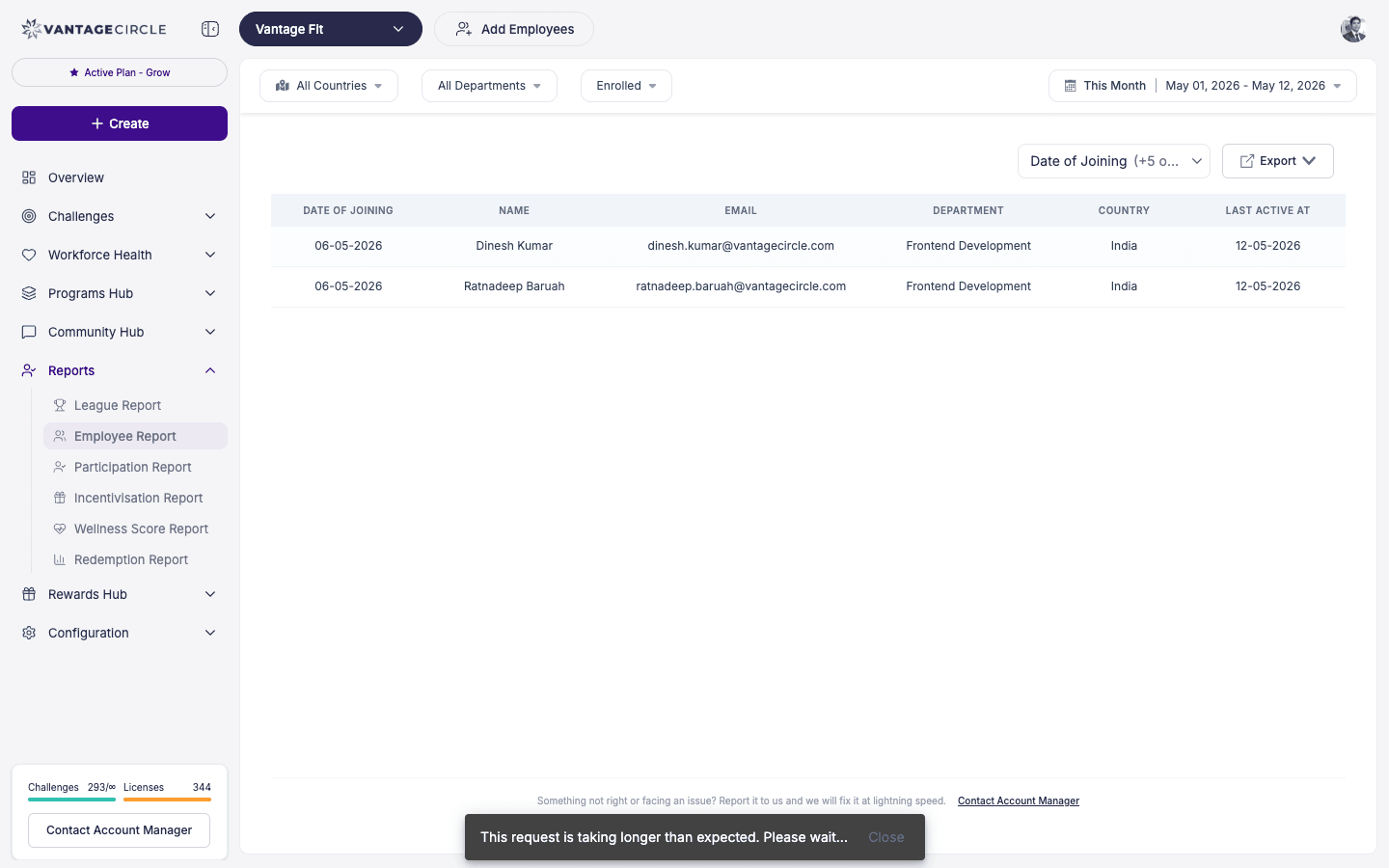
Employee Report
The primary report for understanding your employee base.
What you see:
- List of all employees enrolled in Vantage Fit.
- Enrollment status for each employee:
- Active — using the app regularly.
- Inactive — has an account but not logging in.
- Dormant — has not used the app for an extended period.
- Employee name, email, department, country.
- Last active date.
Filters available: Search by name/email, filter by department, filter by country.
Use case: Monitor enrollment health, identify employees who need re-engagement, track adoption trends month over month.
Transaction Report
A ledger of all points activity across your company.
What you see:
- Every points transaction — earned, awarded, and deducted.
- Employee name and email.
- Transaction type and amount.
- Date and time.
- Source of the transaction (which challenge, action, or admin operation triggered it).
Filters available: Date range, employee search, transaction type.
Use case: Audit points distribution for fairness, reconcile rewards budgets, investigate discrepancies in employee point balances.
Tip: Export the Transaction Report monthly and archive it. This creates a permanent audit trail for your rewards program.
Redemption Report
Track how employees are spending their earned points.
What you see:
- Employee name and email.
- What was redeemed (gift card name, denomination).
- Redemption date.
- Category of reward.
Filters available: Date range, category.
Use case: Understand which rewards are most popular, plan future reward offerings, track total redemption volume for budget forecasting.
Challenge Leaderboard
Performance data for individual challenges (both ongoing and completed).
What you see:
- Score leaderboard — participants ranked by total points.
- Steps leaderboard — participants ranked by total step count.
- Team leaderboard — teams ranked by average score (if teams are enabled).
- Per-user score breakdown — tap any participant to see per-task, per-week details.
Filters available: Department filter, name search. Paginated for large challenges.
Use case: Monitor challenge engagement, identify top performers, export final results for prize distribution.
Tip: The score breakdown per user is one of the most useful tools in the dashboard. It shows exactly which tasks employees are completing and which they are skipping — invaluable for designing better future challenges.
League Report
Available only if Wellness Leagues are enabled for your company.
What you see:
- All employees with their current league tier (Gold, Silver, Bronze).
- Rolling average daily steps per employee.
- Department breakdown — see league distribution within each department.
- Trend data — how league standings have changed over time.
Filters available: Department, date range.
Use case: Analyze activity levels across the organization, compare department fitness, track improvement trends, identify departments that need targeted wellness programs.
Note: Wellness Leagues must be enabled by your Vantage Fit account manager. If you do not see the League Report, contact your account manager.
Wellness Score Report
Available only if the Org Wellness Score feature is enabled for your company.
What you see:
- Employee-level wellness scores (0-100).
- Component breakdown per employee:
- Baseline (20%) — health fundamentals from the HRA.
- Participation (30%) — daily app engagement.
- Activity (30%) — steps, workouts, calories.
- Adherence (20%) — challenge task completion.
- Department and team aggregates.
Filters available: Department, date range.
Use case: Executive wellness reporting, identify at-risk employee groups, measure program effectiveness across the four wellness dimensions.
Note: The Wellness Score Report is only available if enabled by your Vantage Fit account manager. Contact your account manager to request activation.
Filtering Across All Reports
All reports share common filtering capabilities:
- Date range — narrow results to a specific time period.
- Department — filter by organizational department.
- Country — filter by employee location.
- Search — find specific employees by name or email.
Filters are applied before export — your CSV will only include the filtered data.
Exporting All Reports
Every report includes an Export CSV button. Click it to download the currently displayed (and filtered) data as a CSV file. The file downloads directly to your browser.
For detailed export instructions and tips, see How Do I Export Reports as CSV?.
Best Practices
- Check reports weekly during active challenges. The leaderboard and employee report give you early warning signs if engagement is dropping.
- Cross-reference reports. Compare Employee Report (enrollment) with Transaction Report (activity) to find enrolled-but-inactive employees. These are your re-engagement targets.
- Export and archive monthly. Build a historical dataset by exporting key reports at regular intervals.
- Share insights, not raw data. Executives want summaries, not CSV files. Use exports to create simple charts or 1-page summaries for leadership reviews.
- Use League and Wellness Score reports for long-term trends. These are most valuable when viewed over months, not days.
Need more help? Contact your Vantage Fit account manager or email support@vantagecircle.com.
Related articles: