The Org Wellness Score is a composite metric that gives you a single number (0-100) representing the overall wellness health of your organization. It aggregates data from all employees into one score, making it easy to track wellness trends over time.
How the Score is Calculated
The Org Wellness Score is built from four components, each weighted differently:
| Component | Weight | What It Measures |
|---|---|---|
| Baseline | 20% | Health fundamentals from the Health Risk Assessment (HRA) — BMI, blood pressure, chronic conditions, lifestyle factors. |
| Participation | 30% | Daily engagement — are employees opening the app and interacting with wellness features? |
| Activity | 30% | Effort and improvement — steps taken, workouts logged, calories burned, and improvement over time. |
| Adherence | 20% | Challenge compliance — are employees completing assigned tasks and maintaining habits? |
Each component is scored 0-100, then the weighted average produces the final Org Wellness Score.
Tip: A balanced score across all four components is healthier than a high score driven by just one. If Activity is high but Adherence is low, employees are exercising but not following through on challenge commitments.
Viewing the Org Wellness Score
- Log in to the Vantage Fit Admin Dashboard.
- Go to the Workforce Health page.
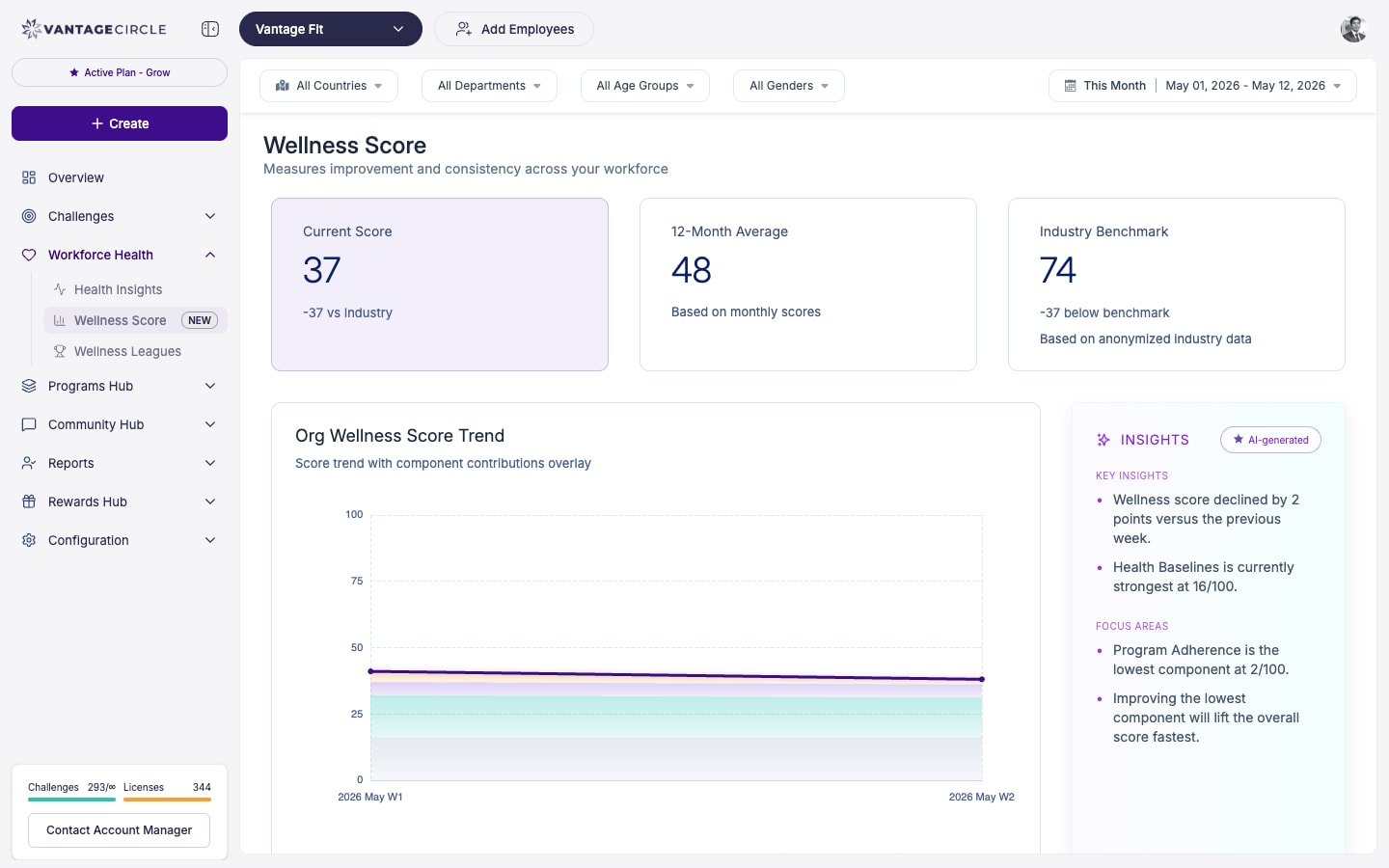
- The Org Wellness Score is displayed prominently at the top.
- Below the score, you will see:
- Trend over time — how the score has changed week over week or month over month.
- Component breakdown — individual scores for Baseline, Participation, Activity, and Adherence.
- Streamed insights — AI-generated observations about wellness trends.
Employee-Level Breakdown
You can drill down from the org-level score to individual employees:
- On the Workforce Health page, scroll to the employee list.
- Each employee shows their individual wellness score.
- Click on an employee to see their component-by-component breakdown.
This helps you identify:
- High performers who maintain strong wellness habits.
- At-risk employees whose scores are declining.
- Patterns — maybe one department is consistently low on Participation.
Note: Individual employee scores are intended for aggregate analysis, not for singling out employees. Use this data to improve program design, not for performance management.
Department and Team Breakdowns
The Workforce Health page also provides breakdowns by:
- Department — compare wellness scores across departments.
- Team — see how different teams are performing.
- Location — compare across countries or cities.
These breakdowns help you target interventions where they are needed most.
Exporting Data
Click Export CSV on the Workforce Health page to download:
- Employee-level wellness scores.
- Component breakdowns per employee.
- Department and team aggregates.
Use this data for executive reporting, wellness program evaluations, or tracking ROI on wellness initiatives.
Enabling the Org Wellness Score
The Org Wellness Score is not a self-serve feature. Your Vantage Fit account manager has to activate this feature for you.
To get it enabled:
- Contact your Vantage Fit account manager.
- Request Org Wellness Score activation.
- Your account manager will configure it for your company.
- Once enabled, data begins accumulating and the score will appear on your Workforce Health page.
Note: The score improves in accuracy over time as more employee data is collected. Initial scores may not be fully representative — give it 2-4 weeks of data collection for a reliable baseline.
Understanding the Insights
The Workforce Health page includes streamed insights — automatically generated observations about your wellness data. These might include:
- "Participation dropped 12% this week — consider sending a push notification."
- "Engineering department has the highest Activity score but lowest Adherence."
- "Monday is your highest engagement day; Friday is the lowest."
These insights help you take action without having to manually analyze all the data.
Best Practices
- Track monthly, not daily. The Org Wellness Score is best used as a monthly or quarterly trend indicator, not a daily metric.
- Use component scores for diagnosis. If the overall score drops, check which component is responsible and target your response accordingly.
- Combine with challenges. Launch targeted challenges to improve specific components — a Streak challenge for Adherence, a Race for Activity.
- Share with leadership. The single-number score is perfect for executive reporting. Back it up with component details when needed.
- Enable HRA for better Baseline. The Baseline component relies on HRA data. If HRA is not enabled, this component will be less meaningful.
Need more help? Contact your Vantage Fit account manager or email support@vantagecircle.com.
Related articles: