Training Plans are personal wellness programs you configure and run at your own pace. They're structured, multi-week programs that progressively build your fitness — starting easy and getting more challenging as you go. Currently available plans include Couch to 5K and Walking Habit Plan, among others.
Before You Start
A couple of things to know:
- Training Plans are not available in Lite Mode. If your company runs Vantage Fit in Lite Mode, you won't see this feature.
- Your company must have Training Programs enabled. If you don't see a Programs tab in the app, ask your HR admin whether Training Programs are turned on.
Note: Training Plans are different from challenges. Challenges are created by your HR admin for groups of employees. Training Plans are personal — you choose when to start, how long to run, and which days to train.
How to Start a Training Plan
Step 1: Find Training Plans
- Open Vantage Fit and tap the Programs tab
- Look for the Training Plans section
- Browse the available plans
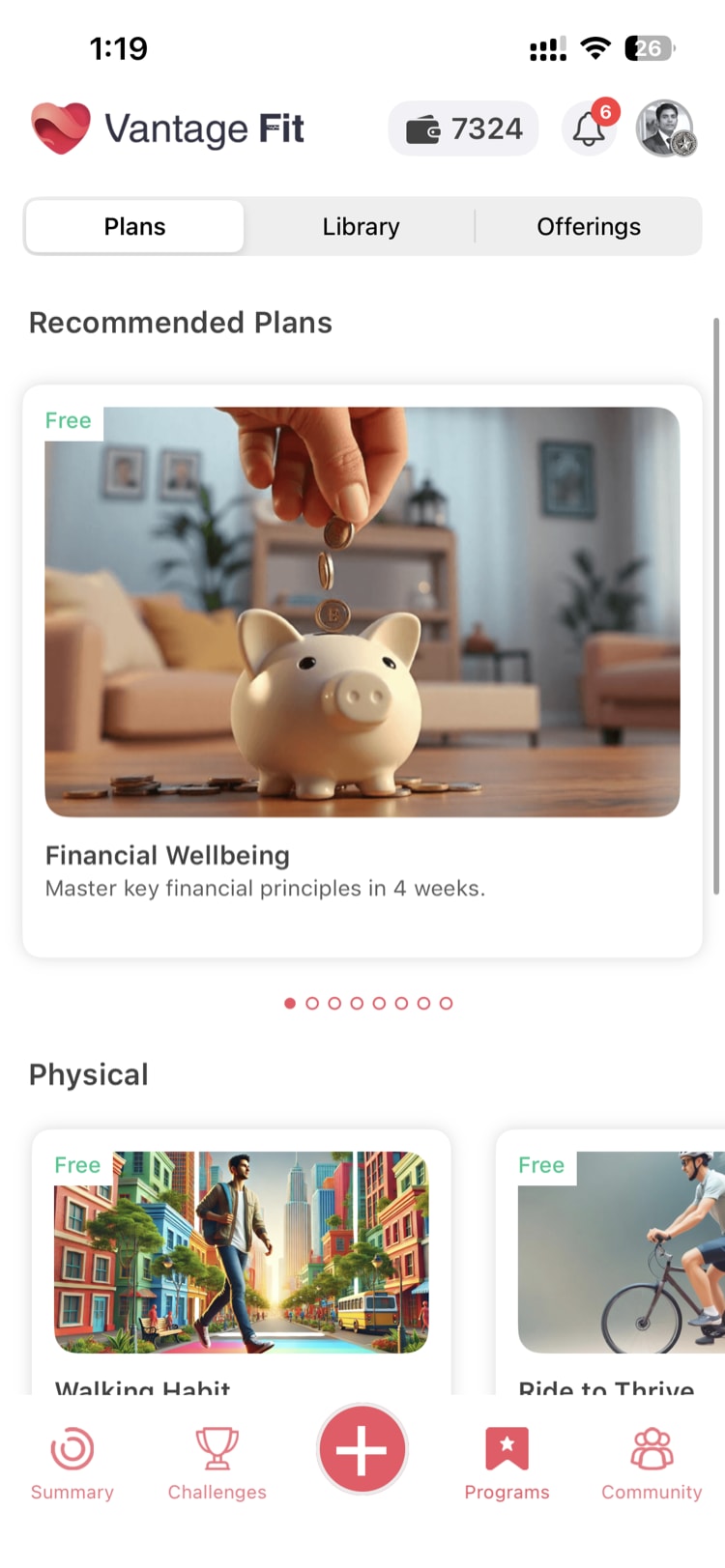
Step 2: Explore a Plan
Tap on any plan to see its detail page. You'll find:
- About — what the plan involves and who it's designed for
- Benefits — what you'll gain from completing it
- FAQ — common questions about the specific plan
For example, Couch to 5K is designed for people who are new to running. It starts with short walks and gradually introduces jogging intervals until you can run 5 kilometers without stopping.
Step 3: Configure Your Plan
Once you've picked a plan, you'll answer three quick questions to personalize it:
- How many weeks? — choose between 4 and 8 weeks for the total program duration
- How many training days per week? — choose between 3 and 6 active days
- Which days? — select the specific days of the week you want to train
Tip: Be realistic with your schedule. If you've never followed a training program before, start with 3-4 days per week. You can always start a new plan with more days later. Consistency beats ambition.
Step 4: Preview Your Plan
After configuring, the app generates your personalized week-by-week plan. You'll see:
- Each week laid out with daily tasks
- Progressive targets that increase over time (e.g., distance or duration)
- Rest days built into the days you didn't select
- A mix of activities — walks, jogs, articles, or videos depending on the plan
Take a moment to review the plan. If it doesn't look right, go back and adjust your configuration.
Step 5: Start Your Plan
Tap "Start Challenge" at the bottom of the preview screen. Your plan starts on the following Monday — not immediately. This gives you a few days to prepare.
Once started, the plan appears as a personal challenge in your Challenges tab.
Following Your Plan Day by Day
After your plan kicks off:
- Check your Challenges tab daily — your training plan shows up alongside any other active challenges
- Complete daily tasks — each day has specific activities (a distance to walk or run, an article to read, a video to watch)
- Tasks are tracked automatically when possible — step-based and distance-based tasks sync from your device. Articles and videos are marked complete when you view them.
- Log manually if needed — some activities may require manual logging, just like regular challenge tasks
The plan is progressive. Early weeks are lighter to help you build the habit. Later weeks push you further. For Couch to 5K, you might start around 1 km in week one and work up to the full 5 km by the final week.
How to Stop a Plan
If you need to quit a plan before it's finished:
- Open the training plan from your Challenges tab
- Go to the challenge detail screen
- Tap "Stop Challenge"
Only you can stop your own training plan — your HR admin cannot stop it for you, and no one else can see or manage your personal plan.
Note: Stopping a plan is permanent for that instance. If you want to try again later, you'll need to start a new plan from scratch. Your previous progress won't carry over.
Tips for Success
- Start with a plan that matches your current fitness level. If you can already jog for 20 minutes, Couch to 5K might be too easy. Look at other available plans.
- Don't skip rest days. They're built into your plan for a reason — recovery is when your body adapts and gets stronger.
- Open the app on training days. This triggers a sync and ensures your activity data is up to date.
- Pair it with a challenge. If your company has an active step challenge, your training plan activities will count toward it too.
What's Available Now
| Plan | Goal | Best For |
|---|---|---|
| Couch to 5K | Build up to running 5 kilometers | Beginners who want to start running |
| Walking Habit Plan | Establish a consistent daily walking habit | Anyone looking to move more consistently |
More plans are being added regularly. Check back in the Training Plans section for new options.
Need more help? Contact your HR admin or reach out to support via the Help option in the app menu.
Related articles: