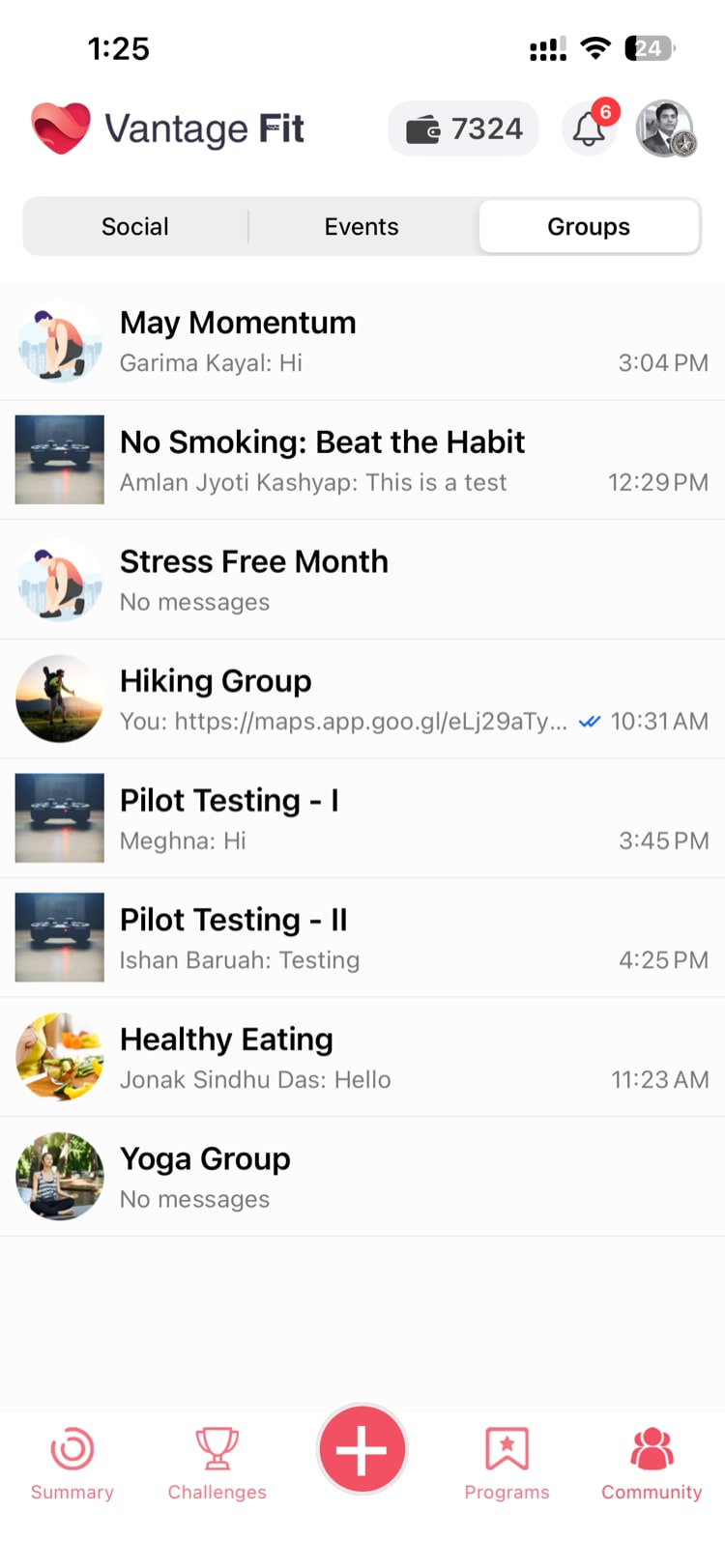
Vantage Fit includes a real-time chat feature that lets employees communicate around wellness activities. As an admin, you can manage group creation, membership, and permissions — though much of the current management is handled by your Vantage Fit account manager rather than through the dashboard UI.
How Chat Works in Vantage Fit
Chat in Vantage Fit uses enterprise-grade messaging infrastructure. Messages are delivered in real time, and employees can send text messages and images within their groups.
Two Types of Chat Groups
Focus Groups
Focus groups are user-created or admin-created team discussion groups. They are typically organized around:
- Departments — A chat group for the marketing team's wellness discussions.
- Interest groups — Running enthusiasts, yoga practitioners, healthy cooking.
- Wellness initiatives — Groups for specific programs or campaigns.
Focus groups persist until they are explicitly deleted. They are independent of any challenge — they are ongoing community spaces.
Challenge Chats
Challenge chats are auto-created when a challenge launches. Key characteristics:
- Every participant of the challenge is automatically added to the chat.
- The chat is tied to the challenge lifecycle.
- It provides a natural space for participants to discuss strategy, share progress, and motivate each other.
Challenge chats require no admin setup. They are generated automatically when the challenge starts.
Enabling Chat for Your Company
Chat is not enabled by default. Your Vantage Fit account manager has to activate this feature for you.
To get chat enabled:
- Contact your Vantage Fit account manager.
- Request chat activation.
- Your account manager enables the feature for your company.
- Once active, the Chat/Groups section appears in the Community tab of the employee app.
Note: If employees report that they do not see a chat or groups option in their app, it likely means chat has not been enabled for your company yet.
What Admins Can Do
Create Focus Groups
Admins can create focus group chats for specific teams or interest areas. Currently, this is handled by your Vantage Fit account manager rather than through the dashboard UI.
What you can specify when creating a group:
- Group name — A descriptive name for the chat group.
- Members — Which employees should be added.
- Department mapping — Groups can be associated with specific departments.
Add and Remove Members
You can manage who is in each focus group:
- Add members — Bring new employees into an existing group.
- Remove members — Remove employees who have left the team or are no longer relevant to the group.
Delete Groups
Focus groups can be deleted when they are no longer needed. Challenge chats follow the challenge lifecycle and do not need manual deletion.
Note: There is currently no dashboard UI for chat management. Group creation, membership changes, and deletion are handled by your Vantage Fit account manager. Contact them if you need groups managed.
Controlling Employee Group Creation
Whether employees can create their own focus groups is controlled by a configuration flag:
- Employee group creation = enabled — Employees can create their own focus groups from the app.
- Employee group creation = disabled — Only admins can create groups.
This flag is configured by your Vantage Fit account manager. If you want to control whether employees can self-organize into groups, contact them to set this flag.
Tip: Allowing employees to create their own groups encourages organic community building. However, if you want to keep groups tightly managed (e.g., department-only groups), disable employee group creation and create the groups yourself.
Groups and Departments
Groups can be mapped to departments within your organization. This means:
- When a new employee joins a department, they can be automatically added to the department's wellness chat group.
- Group membership stays aligned with your organizational structure.
- Department-level wellness conversations have a dedicated space.
Department mapping is configured by your Vantage Fit account manager. Contact them to set up department-to-group associations.
Challenge Chat Details
Challenge chats require no admin management. Here is how they work:
| Aspect | Details |
|---|---|
| Creation | Automatic when a challenge starts |
| Membership | All challenge participants are added automatically |
| New participants | Added to the chat when they join the challenge |
| Removed participants | Removed from the chat if they leave or are removed from the challenge |
| Lifecycle | The chat persists as long as the challenge is active |
Tip: Challenge chats are one of the most effective engagement tools during challenges. Encourage participants to post daily updates and cheer each other on. Challenges with active chats tend to have higher completion rates.
Current Limitations
Being transparent about what is and is not available today:
- No dashboard UI for chat management. All group administration (create, add/remove members, delete) is handled by your Vantage Fit account manager, not through the admin dashboard.
- No message moderation tools. Admins cannot currently review, edit, or delete individual chat messages from the dashboard.
- No chat analytics. There are no reports on chat engagement, message volume, or active participants.
- No direct messaging. Chat is group-only. One-to-one direct messaging between employees is not available.
These are known gaps. Dashboard-based chat management is being considered for future releases.
Best Practices
- Create department-level groups. Give each department a wellness chat space to discuss team-specific wellness goals and activities.
- Keep group names clear. "Marketing Wellness Chat" is better than "Group 7." Employees should know immediately what a group is for.
- Announce new groups. When you create a focus group, send a push notification letting employees know it exists and how to join.
- Monitor organically. Even without formal moderation tools, check in on active groups periodically to ensure conversations are positive and on-topic.
- Use challenge chats strategically. During challenges, pop into the challenge chat to post encouragement and updates from the admin side. Admin participation signals that the company cares about the program.
Need more help? Contact your Vantage Fit account manager or email support@vantagecircle.com.
Related articles: