A Journey Challenge is a steps-only challenge where employees progress through sequential milestones on a visual map. As employees accumulate steps, they advance along the route, unlocking milestones and earning points at each stop. It creates a sense of adventure and makes step tracking feel like a real journey.
When to Use a Journey Challenge
- You want a visually engaging, narrative-driven challenge.
- The primary metric is steps.
- You want employees to feel a sense of progression and discovery.
- You are running a multi-week program and want something more immersive than a Race.
How Journey Challenges Work
- Steps-only — employees accumulate steps to progress through the map.
- Sequential milestones — employees move from one milestone to the next in order.
- Visual map — the app displays a themed route map showing each employee's progress.
- Points at each milestone — employees earn points when they reach a milestone.
- Team or individual — Journey challenges support both modes.
Built-In Templates
Vantage Fit includes 3 built-in Journey templates with professionally designed maps and milestone themes:
| Template | Theme | Description |
|---|---|---|
| 7 Wonders of the World | Global exploration | Progress through the 7 ancient/modern wonders |
| Backpacking Europe | European adventure | Travel across iconic European destinations |
| Everest Run | Mountain climbing | Ascend from base camp to the summit of Everest |
Each template comes with:
- A pre-designed visual map.
- Pre-set milestones with themed names and descriptions.
- Default step targets and point values per milestone (which you can customize).
Tip: The built-in templates are ready to go with minimal configuration. Just set your dates, adjust targets if needed, pick your audience, and publish.
Custom Journey Templates
If you want a fully custom Journey with your own map, milestones, and artwork, this requires coordination with the Vantage Fit design and operations teams.
Requirements for custom templates:
- You must be an annual client with sufficient order value.
- A dedicated designer creates the visual map and milestone assets.
- Your Vantage Fit account manager configures the custom template in the system.
- Plan for a lead time of 2-3 weeks from request to availability.
To request a custom Journey template, contact your Vantage Fit account manager.
Step-by-Step Setup (Built-In Template)
Step 1: Start the Wizard
- Log in to the Vantage Fit Admin Dashboard.
- Go to Create Challenge in the sidebar.
- Select Journey as the format.
Step 2: Choose a Template
Select one of the 3 built-in templates (or your custom template if one has been created for you).
Step 3: Basic Details
- Challenge name — e.g., "7 Wonders Step Challenge".
- Description — explain the journey theme and how progression works.
- Challenge image — banner image for the challenge card.
- Start date and end date — Journey challenges work well at 4-8 weeks.
- Privacy — Public or Private.
Step 4: Customize Milestones (Optional)
The built-in templates come with default targets and points, but you can adjust them:
- Step target per milestone — how many steps to reach this stop on the map.
- Points per milestone — how many leaderboard points are earned at each stop.
Note: Keep milestone targets progressive — earlier milestones should be easier to reach, with later milestones requiring more cumulative effort. This gives everyone early wins while rewarding sustained effort.
Step 5: Team Configuration (Optional)
If you want team-based progression:
- Toggle Enable Teams on.
- Set the maximum team size.
- Team score = average of individual scores.
In team mode, each team member progresses individually on the map, but the team competes on average score.
Step 6: Audience
- All employees or Filtered by department, country, city, etc.
Step 7: Review and Publish
Review your settings and publish. Employees will see the visual map and their starting position once the challenge begins.
What Employees See
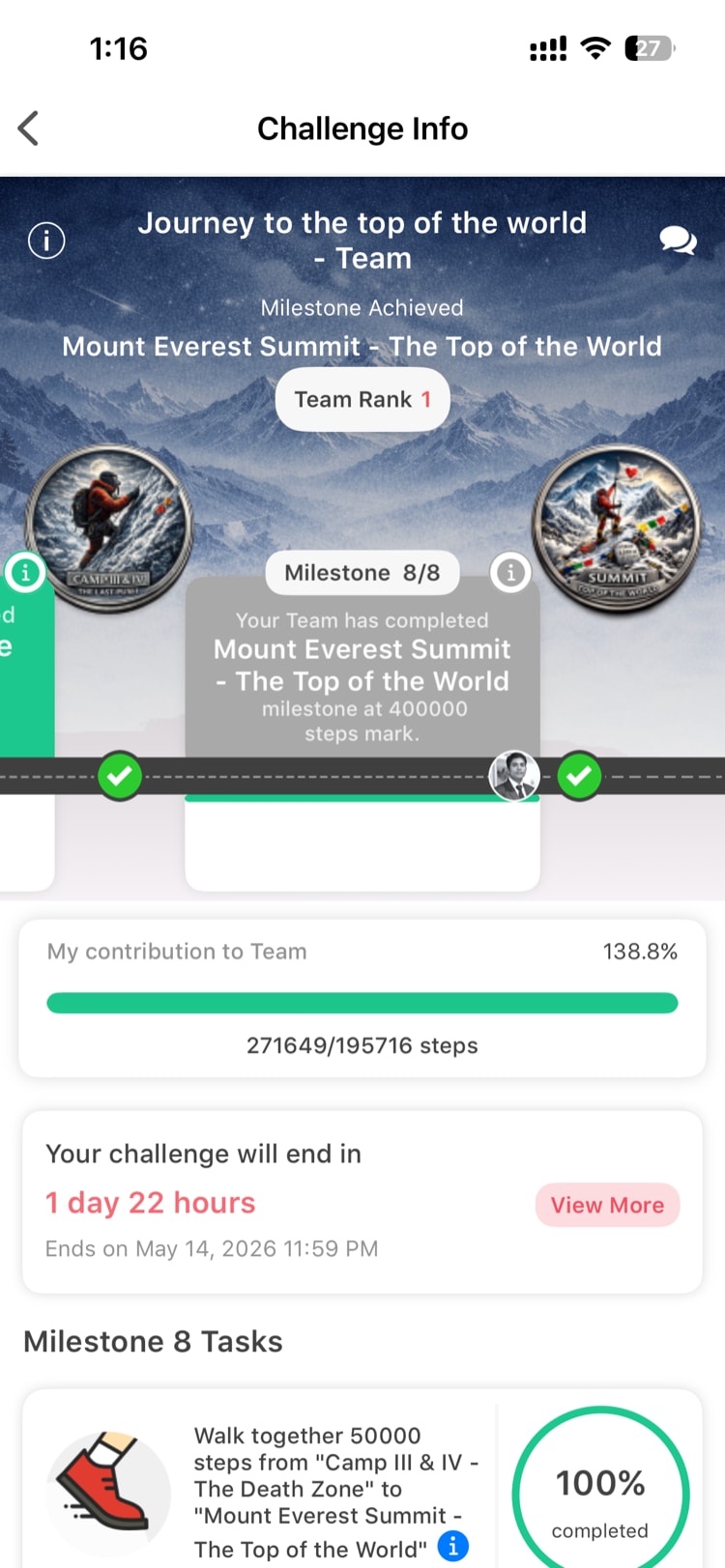
When employees join a Journey challenge, they see:
- The visual map — showing the full route with all milestones.
- Their current position — a marker showing how far they have progressed.
- Next milestone — how many more steps until the next stop.
- Milestone details — tap a milestone to see its name, description, and points.
- Leaderboard — rankings by total points earned.
Best Practices
- Use the theme in your comms. If you are running the 7 Wonders Journey, theme your challenge announcement emails and notifications around exploration and discovery.
- Set achievable early milestones. The first 2-3 milestones should be reachable within the first week. Early wins keep employees engaged.
- Match duration to milestones. If your template has 7 milestones, a 4-6 week challenge gives employees enough time to progress meaningfully without feeling rushed.
- Combine with team mode. Journey challenges with teams create shared narratives — "Our team made it to Machu Picchu this week!"
- Plan ahead for custom templates. If you want a branded Journey for a major wellness campaign, start the request at least 3 weeks before the intended launch date.
Need more help? Contact your Vantage Fit account manager or email support@vantagecircle.com.
Related articles: