A Streak Challenge sets a daily step target for employees and rewards consistency. Participants aim to hit the target every single day — the leaderboard ranks them by total days completed, with total steps as the tiebreaker. It is the simplest format for building daily walking habits.
When to Use a Streak Challenge
- You want to encourage daily consistency rather than one-time bursts of activity.
- Your goal is habit formation — getting employees to walk a set amount every day.
- You want a simple, easy-to-understand format with no weekly themes or multiple tasks.
- A 2-4 week duration works best — long enough to build a habit, short enough to maintain urgency.
How Streak Challenges Work
- Steps only — there is one task type: hit the daily step target.
- Daily target — you set a fixed number of steps (e.g., 8,000) that employees must reach each day.
- Streak mechanic — consecutive days of hitting the target build a streak. Missing a day resets the streak to zero.
- Leaderboard ranking — participants are ranked by days completed (total days they hit the target, consecutive or not). If two participants have the same number of completed days, total steps breaks the tie.
- No themes, no multiple tasks — this is a single-focus format.
Note: The leaderboard counts all completed days, not just the longest consecutive streak. So if an employee hits the target on 18 out of 21 days but broke their streak twice, they still get credit for 18 days.
Step-by-Step Setup
Step 1: Start the Wizard
- Log in to the Vantage Fit Admin Dashboard.
- Go to Create Challenge in the sidebar.
- Select Streak Challenge as the format.
Step 2: Basic Details
- Challenge name — something that emphasizes consistency, like "21-Day Step Streak" or "Daily Walk Challenge."
- Description — explain the rules clearly: "Hit [X] steps every day. The more days you complete, the higher you rank."
- Challenge image — banner image that appears on the challenge card.
- Start date and end date — 2-4 weeks is the sweet spot. Long enough to form a habit, short enough that employees stay engaged.
- Privacy — Public (visible to all employees) or Private (only target audience).
Step 3: Set the Daily Step Target
This is the core configuration:
- Enter the daily step target — this is the number of steps employees need to hit each day to count as "completed."
- Choose a target that is achievable but motivating. 8,000-10,000 steps is a common range.
Tip: Set the target slightly below what you think employees can do. A Streak Challenge is about consistency, not peak performance. If you set it too high, people will miss days early, lose their streak, and disengage. Better to have 80% of employees hitting 8,000 daily than 20% hitting 12,000.
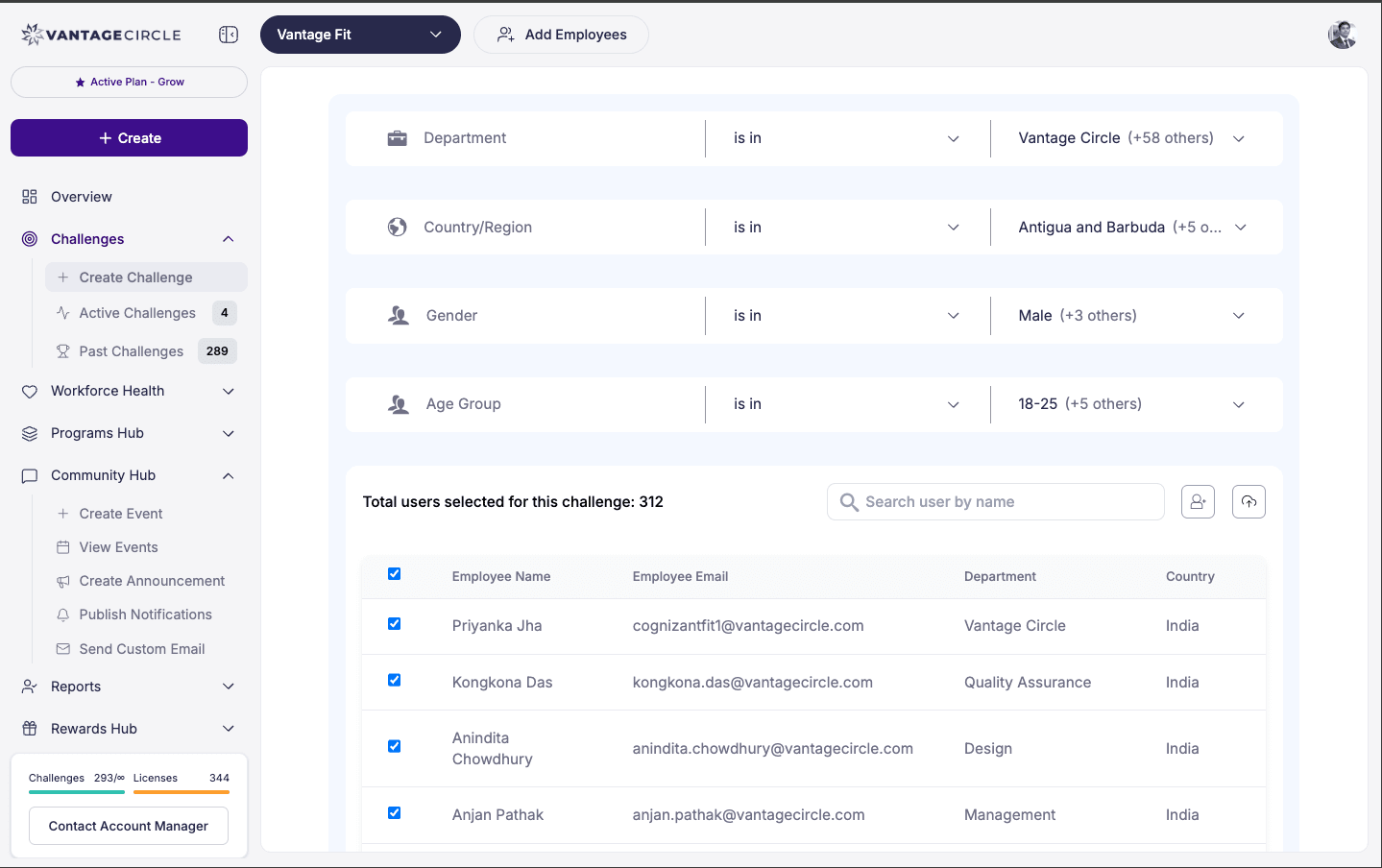
Step 4: Audience
Choose who can participate:
- All employees — company-wide habit-building.
- Filtered — restrict by country, city, department, gender, age range, language, or health risk code.
When you apply any audience filter, the challenge is automatically marked as Private.
Step 5: Team Settings (Optional)
- Enable teams if you want team-based competition alongside individual streaks.
- Maximum team size — how many members per team.
- Team score is calculated as the average of individual scores.
Step 6: Review and Publish
Review all settings and click Publish. The challenge will appear in employees' Upcoming tab and move to Ongoing on the start date.
After Publishing
- Add participants — search and add individuals, or bulk add via CSV.
- Send invitations — email employees to join.
- Monitor the leaderboard — see who is building the longest streaks.
- Send mid-challenge notifications — a nudge at the halfway point can re-engage people who fell off.
Best Practices
- 2-4 weeks is ideal. Shorter than 2 weeks does not give enough time for habits to form. Longer than 4 weeks risks fatigue.
- 8,000 steps is a safe default. It is achievable for most office workers with a lunchtime walk and some evening movement. Adjust based on your employee population.
- Communicate the streak mechanic clearly. Employees should understand that missing a day resets their streak but does not remove their completed days from the leaderboard.
- Run Streak Challenges after onboarding. They work best once employees are already familiar with the app and have their step syncing set up.
- Pair with a small reward. Even a modest prize for the top 10 participants drives significantly more engagement than no reward at all.
How It Compares to Other Formats
| Feature | Streak Challenge | Race Challenge | Custom Challenge |
|---|---|---|---|
| Task types | Steps only | Steps only | Multiple |
| Daily target | Yes (fixed) | No target | Weekly targets |
| Streak mechanic | Yes | No | No |
| Leaderboard metric | Days completed | Total steps | Total points |
| Complexity | Simple | Simplest | Most flexible |
Need more help? Contact your Vantage Fit account manager or email support@vantagecircle.com.
Related articles: