You can manually log any workout or physical activity in Vantage Fit, even if you didn't track it live with GPS. The app supports over 65 activity types, and your company may have added custom ones too.
How to Log an Activity
- Tap the Plus (+) button from any screen.
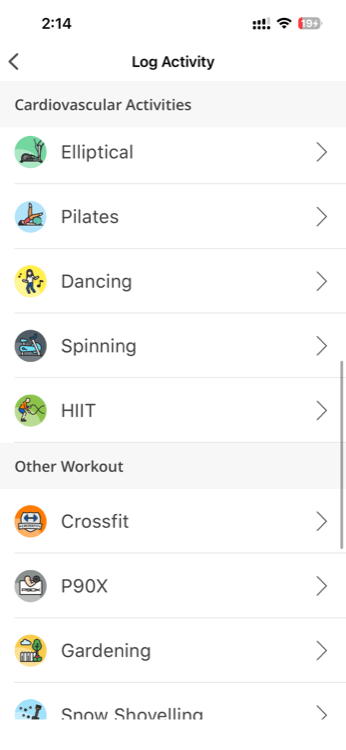
- Select Log Activity.
- Browse or search through the activity categories:
- Cardio — Running, Walking, Cycling, Swimming, Jump Rope, Elliptical, and more
- Sports — Basketball, Tennis, Football, Badminton, Cricket, and more
- Strength — Weight Training, Push-ups, Pull-ups, Squats, and more
- Mind & Body — Yoga, Meditation, Pilates, Tai Chi, and more
- Other — Gardening, Housework, Dancing, and more
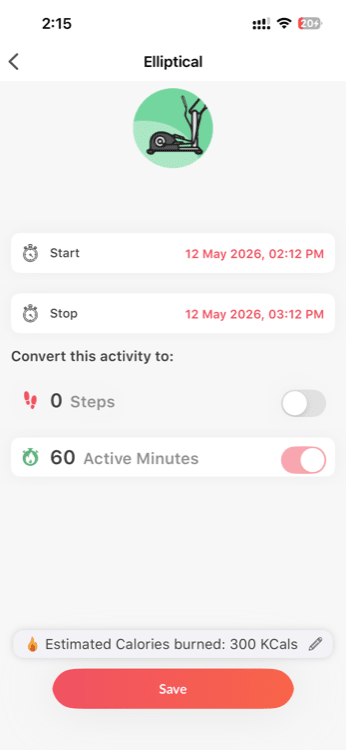
- Select your activity.
- Enter the required value — depending on the activity type, this could be:
- Distance (km or miles)
- Duration (minutes)
- Reps (count)
- Tap Save.
What Happens After You Log
- The activity is saved to your Activity History and visible in your diary view.
- If the activity matches a task in your current challenge (e.g., you logged a 30-minute yoga session and your challenge includes a yoga task), it counts toward your challenge progress automatically.
- Calories burned are estimated based on the activity type, duration, and your profile data.
Tip: Use the search bar at the top of the activity list to quickly find your activity instead of scrolling through categories.
Custom Employer Activities
Your company's HR admin can add custom activity types specific to your workplace wellness program. These appear alongside the standard activities in the list.
For example, your company might add activities like "Desk Stretching," "Walking Meeting," or "Stair Challenge." These work exactly like built-in activities — select, enter value, save.
Note: If you don't see an activity you expect, ask your HR admin whether it's been enabled for your company.
Tips for Manual Logging
- Log promptly — It's easiest to remember the details right after you finish.
- Be accurate — Your challenge scores and calorie estimates depend on the values you enter.
- Check your diary — Tap the Activity Rings card on summary page to verify your logged activities appear correctly.
Need more help? Contact support from Settings → Help in the app.
Related articles: