The Plus (+) button sits at the center of the bottom navigation bar in Vantage Fit. It is your quick-access launcher for logging activities, tracking habits, and syncing your data. Tap it and a bottom sheet slides up with everything you can do right now.
What You See When You Tap It
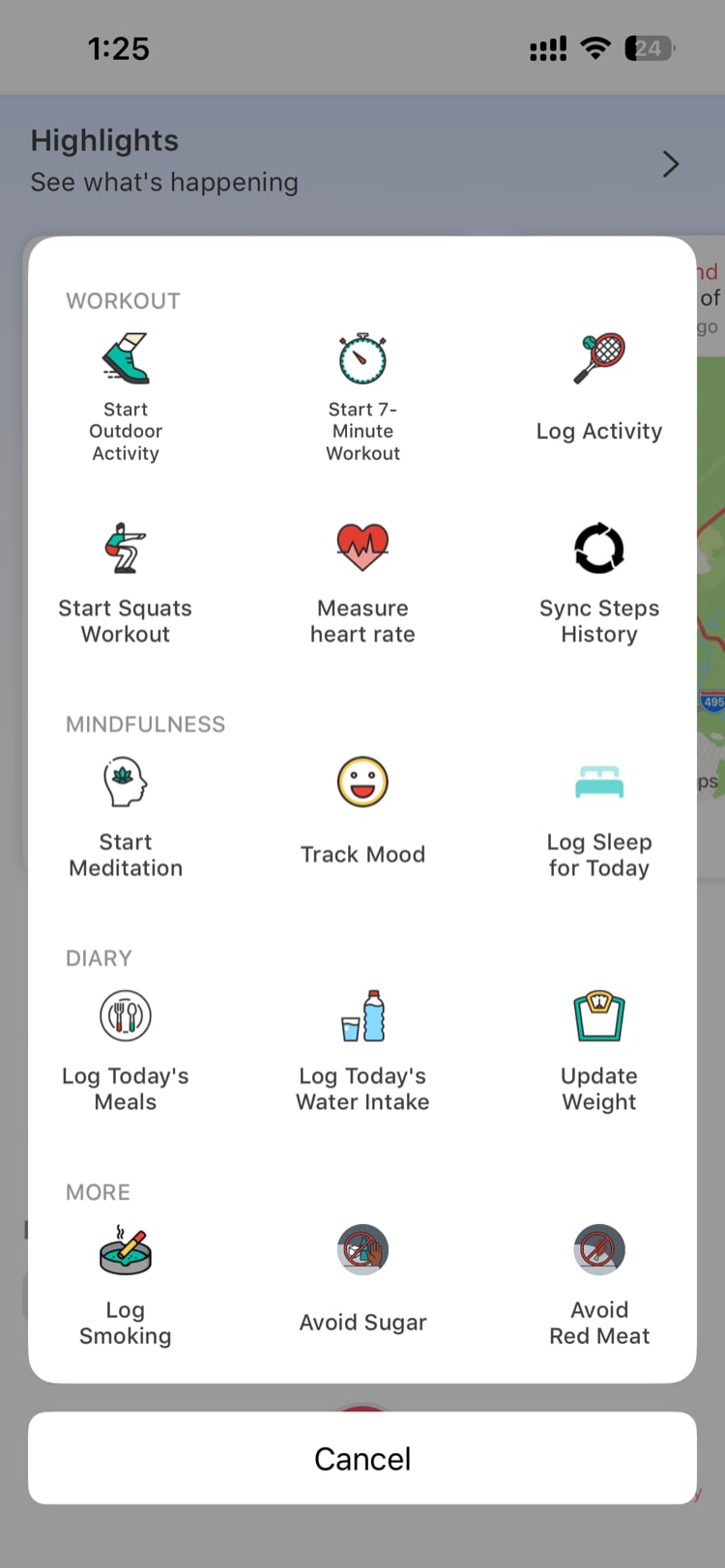
The Plus menu is organized into four sections, each grouping related actions together:
Workouts
These are your physical activity options:
- Start Outdoor Activity — launches a GPS-tracked workout (run, walk, or cycle) that maps your route in real time
- 7 Minute Workout — a guided bodyweight exercise session with timer and instructions
- Log Activity — manually log any physical activity (yoga, swimming, gym, and more) with duration and calories
- Squat Tracker — uses your phone's camera to count squats with real-time AI detection
- Measure Heart Rate — measures your resting heart rate using your phone's camera and flash
- Sync — forces an immediate sync of your step data from Apple Health, Google Fit, Fitbit, or Garmin
Mindfulness
For your mental wellness tracking:
- Mindfulness — access guided meditation sessions of various lengths and themes
- Mood Tracker — log how you are feeling right now with an emoji-based mood scale
- Sleep Log — record when you went to bed and woke up to track your sleep habits
Diary (Habits)
For daily nutrition and body tracking:
- Log Meal — search for foods and log what you ate for breakfast, lunch, dinner, or snacks
- Log Water — quickly add glasses or cups of water to your daily intake
- Update Weight — record your current weight to track changes over time
More (Dynamic)
This section is unique to your company's configuration:
- If your company has created custom daily habits (habit-tracking items like "Avoid Sugar," "Take Vitamins," "Walk to Work"), they appear here as tappable items you can check off daily.
- Log Smoking is always included in this section as a built-in option.
- The items in this section vary by company — your admin chooses which habits to track.
Note: If your company has not configured any custom daily habits, you will still see Log Smoking in the More section.
How It Works on Android
On Android, the Plus menu works the same way. It works the same way — tap the central button in the bottom navigation to open it.
The Android version includes the same functionality:
- 11 base items across the Workouts, Mindfulness, and Diary sections
- Custom daily habits from your company's configuration
- Sync appears at the top of the menu for quick access
The layout and organization may look slightly different from iOS, but every action is available on both platforms.
What About the Web App?
The web app does not have a Plus menu. Instead, use the Today page for quick logging. The web app supports logging water, sleep, mood, and weight, but does not support GPS workouts, Squat Tracker, Heart Rate measurement, or food search.
For the full set of tracking features, use the mobile app.
What If I Am in Lite Mode?
If your company uses Lite Mode, the Plus menu is restricted. Only the Sync button is available — all other options are locked.
Lite Mode is designed for companies that use Vantage Fit primarily for step challenges, so logging food, workouts, and other activities is not part of the experience.
Tip: Not sure if you are in Lite Mode? If you see most Plus menu items grayed out or missing, your company is using Lite Mode. Check with your HR admin if you want access to the full feature set.
Quick Reference
| Action | What It Does | Section |
|---|---|---|
| Start Outdoor Activity | GPS-tracked run/walk/cycle | Workouts |
| 7 Minute Workout | Guided bodyweight exercise | Workouts |
| Log Activity | Manual activity entry | Workouts |
| Squat Tracker | AI-powered squat counter | Workouts |
| Measure Heart Rate | Camera-based heart rate | Workouts |
| Sync | Force step data sync | Workouts |
| Mindfulness | Guided meditation | Mindfulness |
| Mood Tracker | Log current mood | Mindfulness |
| Sleep Log | Log sleep times | Mindfulness |
| Log Meal | Search and log food | Diary |
| Log Water | Track water intake | Diary |
| Update Weight | Record weight | Diary |
| Custom Habits | Company-configured items | More |
| Log Smoking | Built-in habit tracker | More |
Need more help? Contact your HR admin or reach out to support via the Help option in the app menu.
Related articles: